













What are Technology Enhanced Items (TEIs) on the NREMT® Exam?
In the last few years, rapidly evolving technology has enabled new and improved methods for assessment across a broad range of standardized tests. The NREMT® began incorporating those improved assessment methods on July 1, 2024, when it implemented Technology Enhanced Items (TEIs) for its AEMT and Paramedic exams.
The NREMT® extended the new TEIs to their EMR and EMT exams on April 7, 2025. If you’re a candidate for any of the NREMT® certifications, this blog explains what’s different and how you can show up prepared on exam day.
Why TEIs are Challenging for NREMT Students
TEIs aim to comprehensively assess a range of skills, from theoretical knowledge to practical application and analytical abilities. Pocket Prep is introducing NREMT® TEI question types across our web and mobile platforms to help candidates prepare for these new question formats. We want students to feel confident on exam day. Seeing a question format you weren’t expecting on exam day can be stressful and anxiety-producing. Our new question types will help you practice these new formats so you can feel prepared.
Pocket Prep is Introducing TEIs to NREMT Prep
TEIs are incorporated throughout the EMS Clinical Judgment scenario questions. To help students prepare for these new item types, Pocket Prep now offers five TEI types: Clinical Judgment Scenarios, Options Box, Build List, Drag-and-Drop, and Hotspot.
The NREMT provides an interactive experience that allows candidates to sample all question types and preview the actual test instructions and interface for taking the exam at Pearson VUE testing centers.
Clinical Judgment Domain
Pocket Prep introduced the Clinical Judgment domain to the AEMT and Paramedic exams on July 1, 2024. This domain, included in NREMT® AEMT and Paramedic-level exams only, is designed to evaluate the decision-making skills of EMS professionals in real-world scenarios, ensuring they are knowledgeable and adept at applying their knowledge in practical, high-pressure situations. The new domain aims to bridge the gap between theoretical knowledge and practical application, a crucial aspect of medical emergency responsiveness.
The Clinical Judgment domain includes scenarios with three phases: En-Route, Scene, and Post-Scene. Test takers are provided with information for each phase to answer one or more questions in that phase. The phases are always presented in this order. Test takers can refer back to information from a previous phase within the scenario.
For example, while answering a question in the Post-Scene phase, a test taker could refer back to information provided for the En-Route phase. These scenario questions can have a variety of question formats within them, including multiple choice, multiple response, options box, build lists, drag-and-drop, and hotspot.
Options Box
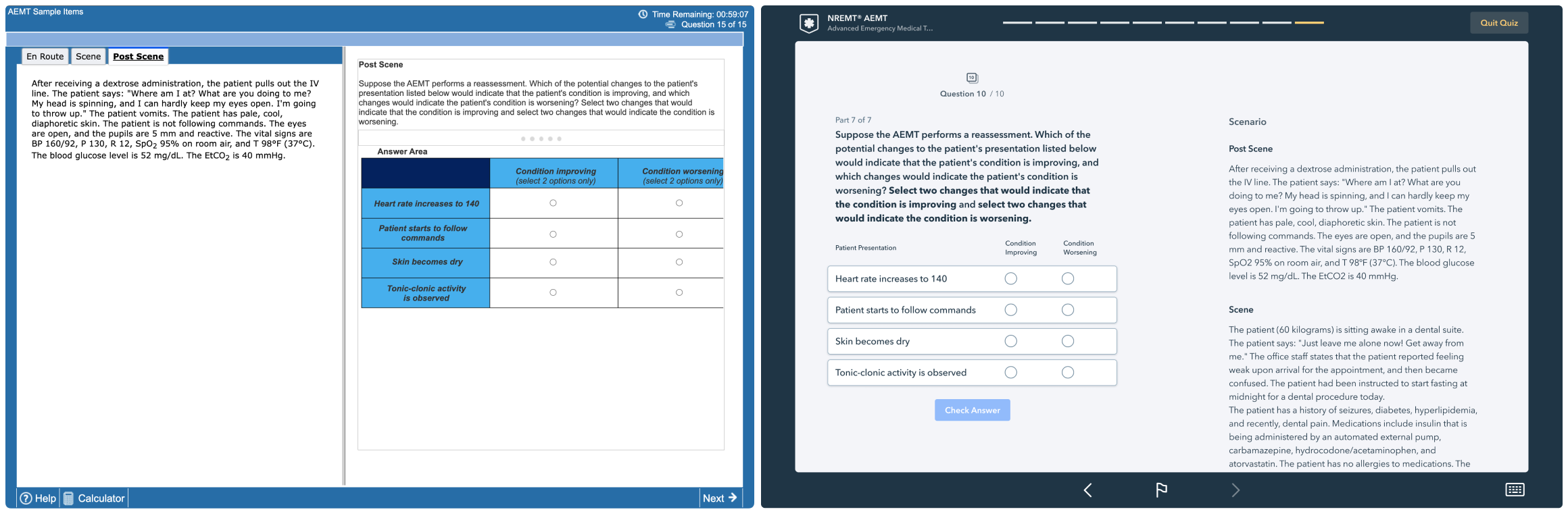
The Options Box TEI, included in all four NREMT® exams, is a closed-ended question that asks the test taker to evaluate multiple row items using the same set of column choices. This challenges students to select multiple answers by marking cells in a grid.
On the NREMT® exams, scenario information is presented on the left with horizontal tabs, and the questions are on the right. In Pocket Prep, our question is always presented on the left, and scenario information is on the right.
Build List
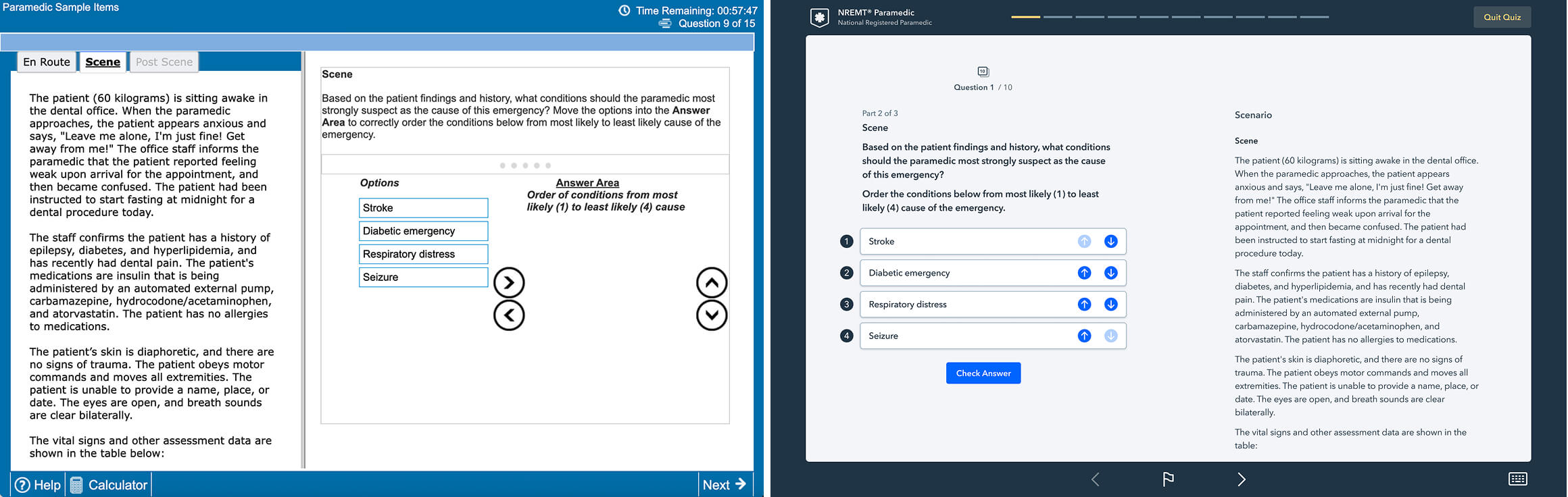
The Build List TEI, included in all four NREMT® exams, presents several options such as interventions, treatments, actions, patient cues, conditions, or injuries. The candidate’s task is to arrange these options in the correct order as specified in the item instructions. Examples of ordering requirements include:
- Sequencing steps in patient care or interventions
- Ranking by likelihood, priority, or importance
- Ordering conditions by severity or level of concern
On the NREMT® exam, candidates move options into the Answer Area in the correct order. This can be done by clicking and dragging each option or by selecting an option and using the arrow buttons. Options can be rearranged or moved back and forth using the same methods. Candidates may also resize the Question and Answer Areas by clicking the five dots and moving the horizontal bar.
In Pocket Prep, the Build List TEI displays all options in a single column with up and down arrows beside each one. Students reorder the list by clicking the arrows until the sequence matches their chosen answer. Once satisfied, they confirm their sequence and lock in their response before moving forward.
Drag-and-Drop
The Drag-and-Drop TEI, included in all four NREMT® exams, presents several options that must be correctly classified or identified based on the item instructions. Examples of what these items may ask include:
- Determining which conditions are indicated by a patient’s signs and symptoms
- Identifying appropriate treatments and supporting reasoning
- Prioritizing the criticality of conditions
- Determining differential diagnoses
- Identifying pathologies associated with patient history
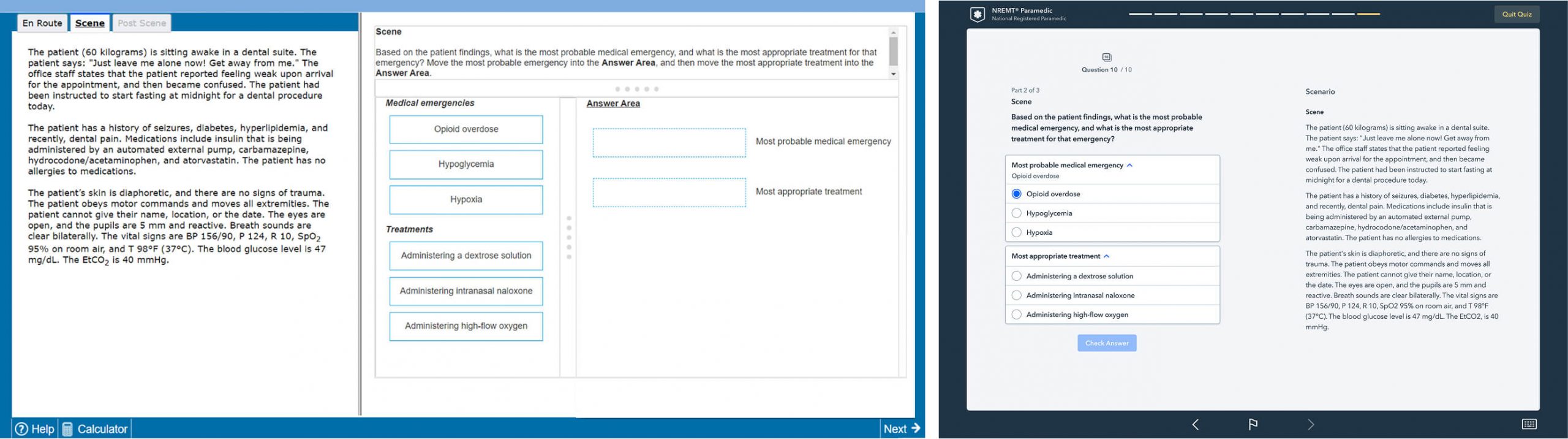
On the NREMT® exam, candidates move each option into its correct classification in the Answer Area by clicking and dragging it into the space next to the appropriate label. Screen areas can also be resized by clicking the five dots and moving the horizontal or vertical bars.
In Pocket Prep, Drag-and-Drop is adapted into a multi-part format designed for mobile-friendly use. Students see each classification section separately, with a set of possible answers to choose from. Instead of dragging items across the screen, they simply tap the best answer for each section, ensuring smooth navigation and accessibility across all devices.
Hotspot
The Hotspot TEI, included only in the NREMT® Paramedic and AEMT exams, presents several options that must be correctly classified or identified according to the item instructions. Examples of what these items may ask include:
- Identifying corresponding areas of medical device monitoring and tracing based upon clinical information
- Identifying the anatomical location of a described injury or condition
- Pinpointing the source of a clinical sign shown in an image
- Locating the correct landmark for a procedure (e.g., needle decompression, IV access)
- Identifying the area of the body affected based on a patient’s presentation
- Recognizing visual indicators of pathology within an image
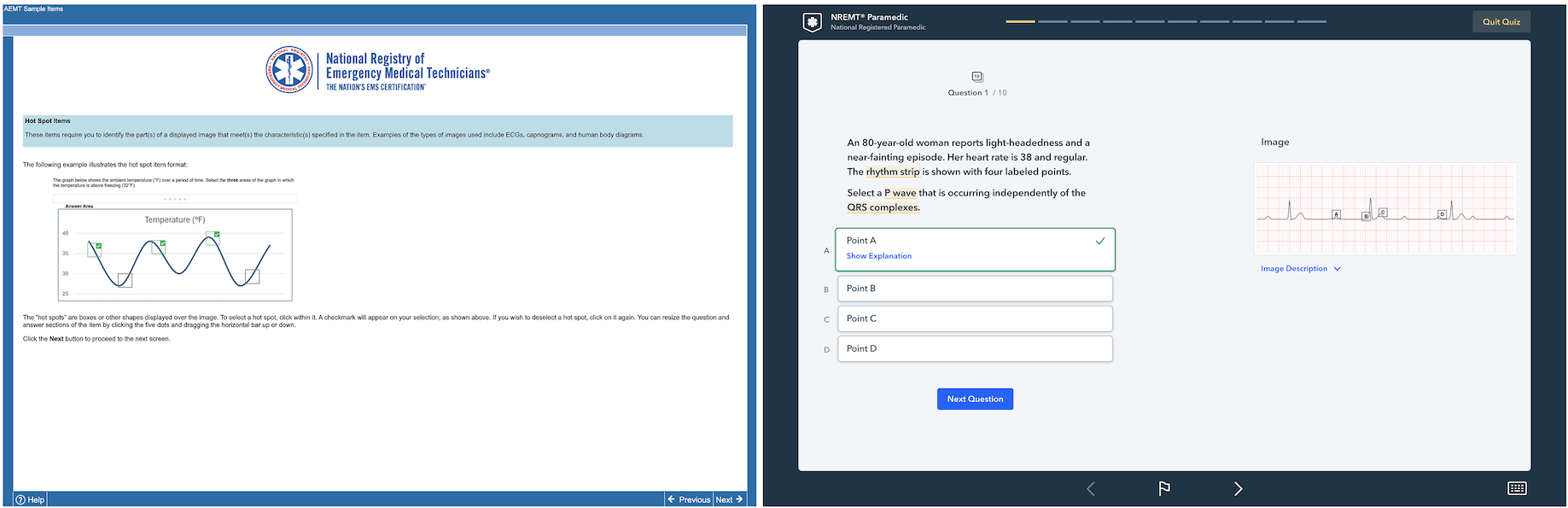
On the NREMT® exam, candidates respond by clicking directly on the region of the image that best matches the question’s criteria. The selected area is marked, and only one location can be selected at a time unless otherwise specified.
In Pocket Prep, Hotspot items are adapted into a mobile-friendly format. Students see the same image with clearly defined labels marking distinct regions, then select their answer from multiple-choice options corresponding to those labels. This preserves the visual, location-based nature of the item type while ensuring smooth navigation and accessibility across all devices.
Why Introducing NREMT TEIs Matters
Research indicates that understanding the format and types of items significantly enhances performance on exam day. Our prep items are designed to approximately simulate what students will see on their exams. We recommend that anyone taking these exams familiarize themselves with these item types in addition to practicing them with Pocket Prep. We offer an intuitive and user-friendly interface that effectively replicates the challenges posed by these advanced question types. By familiarizing students with these item types, Pocket Prep is equipping them with the tools they need to approach NREMT® TEIs confidently and with minimal stress.
What We’ve Learned From the Experts
Learning science expert Cindy Nebel, PhD, concluded: “Test expectancy is a phenomenon where students adapt their study strategies based on knowing the format of the test they’ll take. The research shows that regardless of the format of practice questions, students will perform better on the test if they know what the test will look like. As students learn, they literally process the information differently to prepare for how they will have to use it later on. Because students can adjust the way they encode, practice test format matters less than simply knowing what’s coming.”
Pocket Prep’s NREMT TEI Release Timeline
We plan to release our Technology Enhanced Items (TEIs) on a rolling basis, beginning in November 2024, with additional question formats launching throughout 2026:
- Options Box: November 2024
- Clinical Judgment Domain Scenarios: November 2024
- Build List (Ordering and Sequencing): October 2025
- Drag-and-Drop: October 2025
- Hotspot: July 2026
Prepare for the NREMT TEIs with Pocket Prep
At Pocket Prep, we are committed to providing members with the most up-to-date question formats to enhance their exam readiness and success on the NREMT® EMR, EMT, AEMT, and Paramedic exams. Our commitment to continuously enhancing our product includes developing TEIs that align with emerging certification trends. These updates will help prepare EMS students not only for the exam but also for using clinical judgment in real-world practice.
